Two New Criteria for Application Version Comparison in Jamf Pro Smart Computer Groups
Introduction
Up until Jamf Pro version 11.22, there was a single built-in way of comparing application versions in Smart Computer Group criteria. This has been done using a combination of the Application Title or Application Bundle Identifier criteria followed by the Application Version criterion.
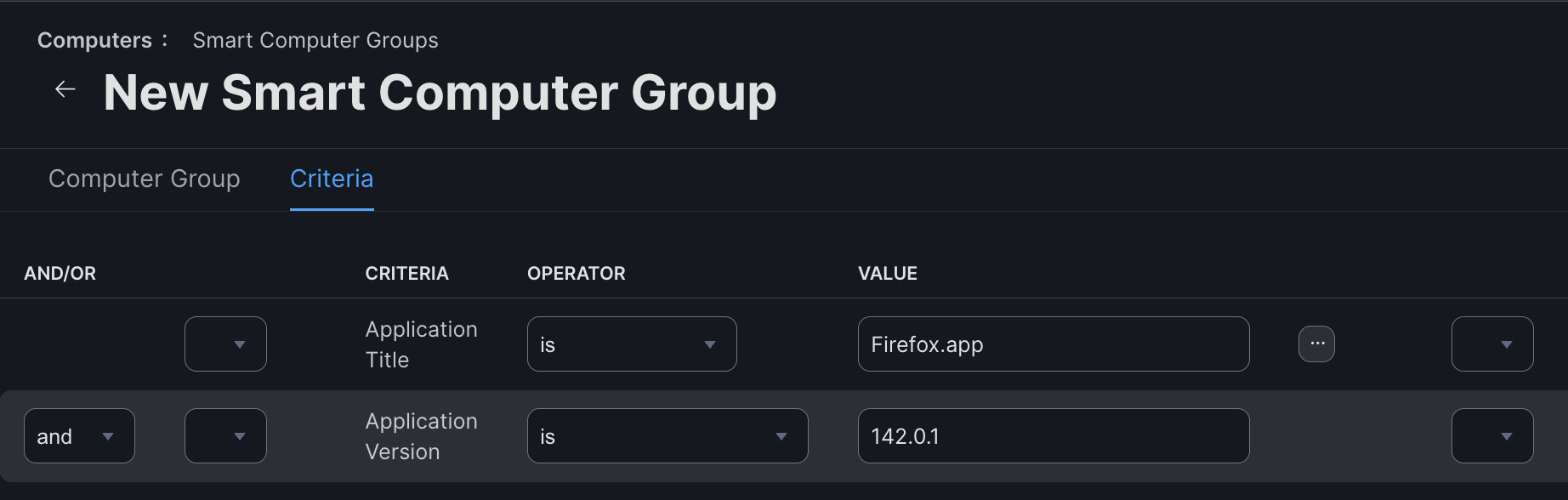
The application version that is imported into the Jamf Pro inventory is normally the value of the CFBundleShortVersionString key that resides in the Info.plist file of the application bundle. This corresponds to the version that you see in Finder if you look at the Get Info for the application, or add the Version column to the List view of Finder.
However, for a legacy reason where Microsoft once flipped the versions around, the Jamf code specifies that if “Microsoft” is in the application name, Application Version will instead check the CFBundleVersion key from Info.plist instead. This has surely caused confusion to many Jamf Pro admins (not least myself when I first discovered it), since it doesn’t match what we see in Finder. For those of us writing AutoPkg recipes for uploading packages to Jamf Pro, it has also caused additional work for many titles.
For example, most AutoPkg .download or .pkg recipes, including those that download Microsoft titles, will populate the version key using the CFBundleShortVersionString value. Occasionally, however, application vendors or open source developers use an inconvenient string for the CFBundleShortVersionString value, that does not lend itself well to version comparison. Bearing in mind that most AutoPkg .download recipes were originally written with [Munki] in mind, recipe writers would sometimes switch to using CFBundleVersion instead if it is a better string for use in version comparisons, as Munki can use either.
When the value of the version string being outputted from the .download or .pkg recipe doesnt match Jamf’s rules, we’re left with two options:
- Write a different
.downloador.pkgrecipe which reads the version that matches Jamf’s rules. - Create an extension attribute script to read the appropriate version string, and use this in the smart group criteria instead of the built-in Application Version criterion.
Neither of these options are attractive - the first meaning you have to keep track of changes to the original recipe in case the download method changes, the latter meaning you have to maintain a script which could also be affected by those same changes. This is a duplication of effort, and also a source of confusion for the community dealing with multiple recipes for the same software title.
Some recipes have been written giving the option of overriding the version string used, but this never became a standard, so is quite rare.
New criteria options in Jamf Pro 11.23.0
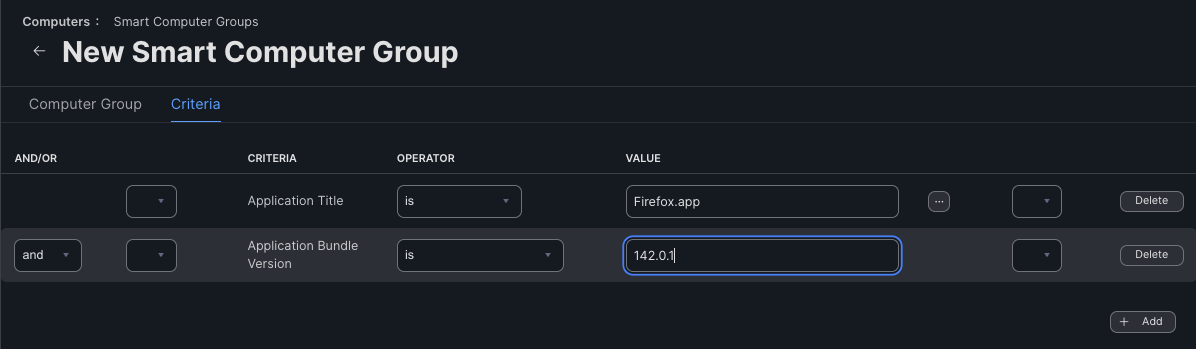
The great news for Jamf recipe writers is that as of version 11.23.0, two new Smart Computer Group version criteria are available:
Application Bundle Short VersionApplication Bundle Version
These criteria correspond to the CFBundleShortVersionString and CFBundleVersion values respectively, and can directly replace the Application Version criterion.

What does this mean for Jamf AutoPkg recipes?
Recipe writers can now use the same key as Munki users, so all existing .download recipes should now be able to be used.
Recipe owners are encouraged to check their existing recipes, to see if an extension attribute is being used, or to see if a duplicate recipe was created in the last to use the alternative version string. These could all soon be discarded and deprecated.
However, this has the potential to add complexity to your catalogue of Smart Computer Group templates, as there is now either an additional template required, or the existing template could be amended so that the criteria name can be overridden in the recipe.
As you are already likely to either have two templates, one for using Application Version and one for using an extension attribute criterion, I would recommend consolidating all three into one, where the criterion value is overridable. The comparison logic vsries between organisations, but is usually consistent across all three possible criteria - either is, is not, matches regex, or does not match regex.
If you’re not using regex to match the version string or any higher version, you’re missing out on a Munki-like experience of version comparison that prevents unwanted (and often failing) downgrade attempts! See my post on using the VersionRegexGenerator processor.
Here’s an example Smart Computer Group template for a .jamf recipe that would work with any of the three criteria:
<?xml version="1.0" encoding="UTF-8"?>
<computer_group>
    <name>%computergroup_name%</name>
    <is_smart>true</is_smart>
    <criteria>
        <criterion>
            <name>Application Title</name>
            <priority>0</priority>
            <and_or>and</and_or>
            <search_type>is</search_type>
            <value>%JSS_INVENTORY_NAME%</value>
            <opening_paren>false</opening_paren>
            <closing_paren>false</closing_paren>
        </criterion>
        <criterion>
            <name>%VERSION_CRITERION%</name>
            <priority>1</priority>
            <and_or>and</and_or>
            <search_type>is</search_type>
            <value>%version%</value>
            <opening_paren>false</opening_paren>
            <closing_paren>false</closing_paren>
        </criterion>
    </criteria>
</computer_group>
Your recipe will now need to include a value for the VERSION_CRITERION key that is one of the following:
Application Bundle Short VersionApplication Bundle Version%EXTENSION_ATTRIBUTE_NAME%
Note that the above example is not taking advantage of
VersionRegexGenerator. Adjust your template accordingly if you are -%version%would become%version_regex%and there may be further criteria to account for longer version regexes.
Do I have to update my recipes?
No, not at all! The existing Application Version criterion is not deprecated, so you don’t have to make these changes any time soon. This is just an opportunity to simplify recipes and remove unwanted extension attributes, that you can do if and when you feel like it.
Conclusion
I’m looking forward to going through my own recipes and getting rid of those now-unnecessary extension attributes and almost-duplicate recipes!
However… Don’t be too keen! Not everyone is on the latest Jamf Pro version. Premium Cloud and On-Premises customers are often a few versions behind. If your recipes are publicly shared - especially if they are in a repo in the AutoPkg GitHub organisation - please consider waiting a few months before updating your recipes - they will continue to work as they are. But for your own private recipes (and certainly your .jamf recipes), you can go ahead and tidy up your recipes and get rid of all those extension attributes from your Jamf Pro instance.