Dissect And Replace Your Monolithic Legacy Configuration Profiles
Introduction
Famously (or, infamously), when creating a configuration profile using the Jamf Pro admin console, some of the payloads are constructed such that to enforce any single setting, you have to enforce all settings. Over the years, Jamf have updated some of those payloads so that specific settings can now be assigned, but payloads such as Restrictions, Accessibility, and Login Window Settings still use the old style “monolithic” payload.
A workaround that many Jamf Pro admins use is to avoid those payloads altogether - where possible - and upload a custom payload instead. This consists of a PLIST file containing the key/value pairs to be assigned, set to the relevant domain, for example com.apple.applicationsettings for many (but not all) of the settings in the Restrictions payload.
However, if you’ve been using the console to apply settings over the years, depending on your record-keeping prowess, you may not know which settings were intended to be enforced, and which just ended up enforced to the defaults at the time the payload was first enabled. Maybe you have to start again? Imagine you’re an MSP looking after multiple customers, with many different sets of configurations and restrictions built up over the years. Do you have a record of every new request that was made?
Contents
- Introduction
- Contents
- Compliance Benchmarks - another spanner in the works
- Discovering duplicate key assignments
- Enter ProfileConflictsFinder
- Migrating away from Monolithic Profiles
- Enter MobileconfigDissector
- Conclusion
Compliance Benchmarks - another spanner in the works
Or “wrench”, for my colleagues across the Atlantic Ocean
The macOS Security Compliance Project (mSCP) provides a mechanism for generating custom profile payloads for a range of security baselines, including those provided by the Center for Internet Security (CIS), the National Institute of Standards and Technology Department of Commerce (NIST), and others. The Jamf Compliance Editor provides a user interface for generating the payloads and uploading them to Jamf Pro, and the recent addition of the Compliance Benchmarks feature in Jamf Pro cloud instances makes creating these profiles easier than ever.
However, many of the baselines create profiles that set configurations in the same domains that the monolithic profiles are also setting, not least com.apple.applicationsettings and com.apple.loginwindow. If you have ever set up a monolithic profile that uses the Restrictions payload, then if you apply any benchmarks, you’re most likely now deploying the same key in the same domain to the same devices two or more times. Even if you only ever wanted to set a single setting, such as Software Update Deferrals, which are part of the monolithic Restrictions payload in Jamf Pro.
Does that matter? The most restrictive setting applies, right?
Wrong!
Or, rather, perhaps not. The most recently applied setting is the one that matters. You can’t define the order that profiles are deployed, so you can’t define the behaviour of a setting applied more than once.
In short, you really don’t want to do that!
Discovering duplicate key assignments
To find out which keys are duplicated, there are existing methods for doing this on a managed Mac on which profiles have already been deployed. For example, Nindi Gill’s Low Profile and Dan Brodjieski’s profile_parse. You run these on a test Mac and duplicate assigned keys are shown.
However, it may not be practical to run these tools on a test client if you’re managing many instances, and it won’t show all potential duplicate assignments unless you scope all the profiles in the instance to that one machine.
Enter ProfileConflictsFinder
I decided to use the Jamf Pro API to analyze all profiles in an instance and look for any key that has been assigned more than once. I’ve designed ProfileConflictsFinder, a script that downloads all the profiles in an instance using JamfUploader, and produces a CSV of any key in any domain that exists in more than one profile, showing the profile name, configuration domain, key name and value. Optionally, it will look up and display the default value in Apple’s MDM Schema for that key.
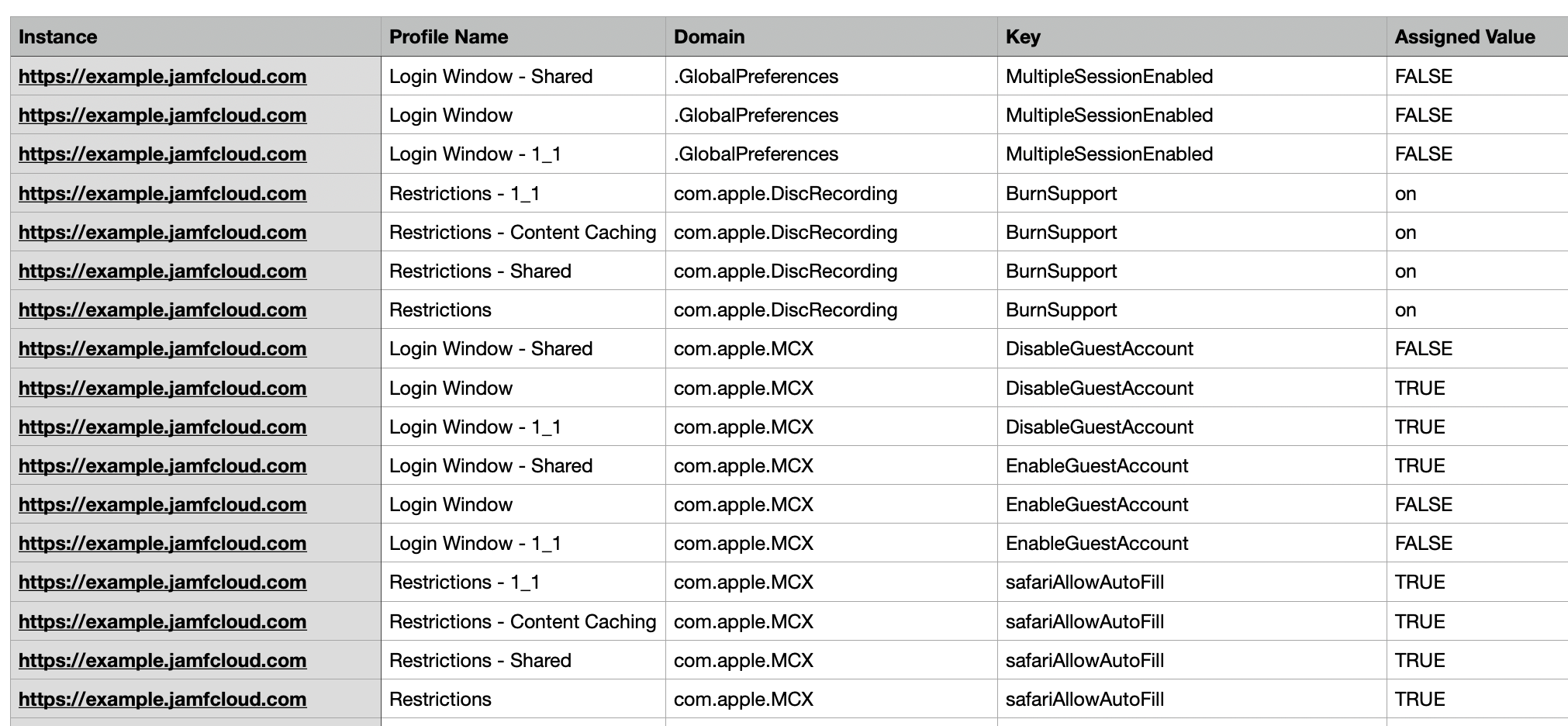
The script may be used interactively so that you can supply the required URL, username and password via prompts, or each parameter may be supplied via the command line, allowing the script to be used by an overlying tool such as a swiftDialog workflow:
./analyze-profile-conflicts.sh --url https://example.jamfcloud.com --username myuser --password mypass
For full instructions on use, including additional options, check out the README.
Multitenant Jamf Tools - analyze-profile-conflicts
For those of you familiar with the Multitenant Jamf Tools (MJT), I have also included the same functionality into this project, in the analyze-profile-conflicts script, taking advantage of the ability to use stored credentials and run the script on multiple instances at once.
Migrating away from Monolithic Profiles
OK, so we’ve identified duplicate and conflicting keys. But, what do we do with those monolithic profiles to resolve it? As mentioned earlier, there may be many values that were never asked to be assigned. But who knows?
I’ve often advised organisations to start again if they are contemplating deploying compliance benchmarks. It’s a good time to redefine the complete set of restrictions. But if you’re not in a position to do that, the best thing you can start with is to migrate away from the monolithic profiles and use either blueprints or custom payloads.
Blueprints are obviously the future of configuration management using Jamf Pro, but as of the time of writing this article, there isn’t currently a public API for blueprints, so we can’t yet use any tooling to include these in any conflict analysis (the good news is that settings deployed using declarative device management (DDM) will always override anything set in an MDM profile). The compliance benchmarks feature of Jamf Pro also still uses custom payloads for now, so performing conflict analysis may currently be easier if all settings are provided by MDM.
Enter MobileconfigDissector

I devised another new script to handle dissecting a monolithic configiration profile from Jamf into component payload PLIST files for each domain contained within it.
MobileconfigDissector is a standalone python script that takes a downloaded mobileconfig file, removing the encryption if necessary, analyzes all assigned keys, compares them to the default values according to Apple’s MDM specification, discards any keys where the default value was assigned, and outputs PLIST files for each domain (e.g. com.apple.applicationsettings, com.apple.loginwindow).
python3 mobileconfig_dissector.py /path/to/some.mobileconfig
These PLIST files can be uploaded to Jamf Pro in new profiles, or used as a basis for manually creating new blueprints, allowing you to remove the old monolithic profiles without changing any settings on the devices.
Multitenant Jamf Tools - dissect-monolithic-profile
For those familiar with Multitenant Jamf Tools, I’ve taken this a step further. With the help of a new AutoPkg processor, MonolithicProfileDissector, and recipes included in the MJT project, the dissect-monolithic-profile script:
- Takes the name of a profile in a selected instance as an input
- Downloads the profile using the Jamf Pro API (JamfUploader)
- Extracts the mobileconfig file
- Performs the analysis, discarding keys with default values and unrecognized keys
- Creates the required PLIST files for each domain
- Creates (uploads) new custom profiles for each domain using the Jamf Pro API (JamfUploader)
- Optionally, a target scope may be defined (for safety reasons, by default, no scope is assigned)
This allows you, theoretically, to replace a monolithic profile in a single step, as easy as something like:
./dissect-monolithic-profile.sh --profile-name "Student Restrictions" --name-prefix "Student Restrictions"
Of course that should be done with the upmost of care on a production instance, especially if setting a target group with the --target-group option!
Conclusion
Migrating away from monolithic configuration profiles to blueprints can be a major project. I hope that any of the tools I’ve made available today, be it ProfileConflictsFinder, MobileconfigDissector, the new MJT tools, or the MonolithicProfileDissector processor, may ease that burden a little bit!
When blueprints become available to read and create via the Jamf Platform API, which was announced at JNUC last year, I hope to update these tools to use blueprints to deploy the payloads. Watch this space, I guess!
Let me know if you use any of the tools, either in the Discussions below or in the #jamf-uploader or #jamf-msp channels in the Mac Admins Slack.