AutoPkg Wizard - a new open source app for AutoPkg users
Introduction
I first came across AutoPkg after attending Mac Admins @ Penn State conference in 2014 and seeing Greg Neagle’s seminal presentation “You Oughta Check Out AutoPkg” (Slides 1, Video 2), and especially Steve Yuroff’s presentation “Going MAD: From closed-in-box to ready to rock, using Munki, AutoPkg and DeployStudio” (Slides 3, Video 4), a talk that basically taught me everything I needed to know to manage a Mac at that time.
Twelve years later, and I’ve been happy to make small contributions to the ever-popular AutoPkg project, such as the JamfUploader processors, YAML-formatted recipe support, a few application recipes, and constant nagging about the recipe map idea that speeds AutoPkg runs up considerably. I’ve also presented or co-presented about some aspect of AutoPkg, at JNUC (twice, once with Anthony Reimer), Mac Admins @ Penn State (with Anthony again), and MacSysAdmin (with Katiuscia Zehnder).
I’ve apparently also posted in the Mac Admins Slack #autopkg channel 3800 times 😬 since my first post complaining about an app not versioning itself properly in June 2015.
Many people love AutoPkg, but are still not 100% comfortable at the command line. AutoPkgr from the Linde Group has satisfied the needs of those folks since it was created, also in 2014. However, it pre-dates the age of SwiftUI, and has seen slow development since around 2018. One of the problems with AutoPkgr is that, while AutoPkg has supported YAML-formatted recipes since version 2.3, AutoPkgr still isn’t able to find them.
Bad Good Vibes Everybody
I’ve always had a mental block stopping me making the leap to learn Swift. I’m not sure why. Perhaps it’s the horror stories many have told about the changes with each major version. Or the problems I had when attempting to maintain python-jss and just not being able to get my head around it, which reminded me of my struggles with advanced mathematics at school.
A conversation in the #autopkg channel on 28 March led to a challenge for someone to create a replacement for, or alternative to, AutoPkgr. This got me thinking about trying Swift again, now that Agentic AI can help with building tools in an unfamiliar programming language. I started this journey with plist-yaml-plist (8), a smaller, command-line-only project with a fully defined scope, to get the hang of working in Xcode with Apple Intelligence. The ease with which that conversion progressed gave me the confidence to write a plan for a new AutoPkg app, and see how AI dealt with it. I didn’t go our trying to replicate AutoPkgr, but just thinking about the things I would like to. see in an AutoPkg wrapper app.
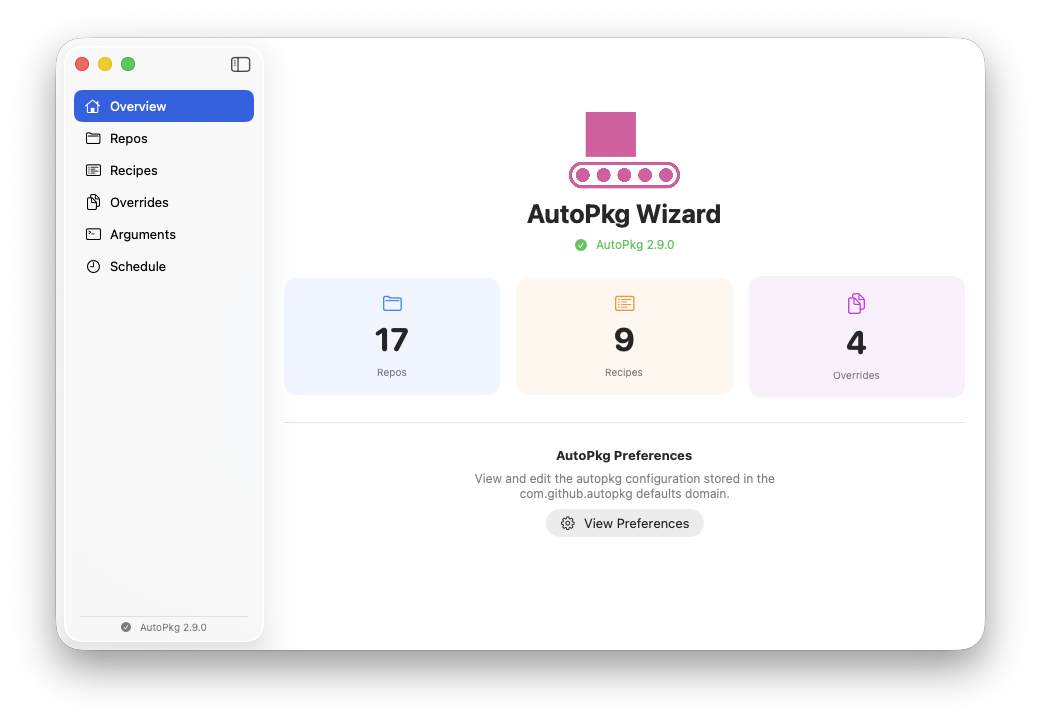
The process went surprisingly well! The result is an app I have called AutoPkg Wizard.
AutoPkg Wizard
The idea of AutoPkg Wizard is not to provide all the functionality that was baked into AutoPkgr. For example, AutoPkgr provides installation support for Git, AutoPkg, Munki, and various integrations with tools, some in varying degrees of obsolescence (MacPatch (5), HipChat anyone?). My thinking is that you should either be able to use AutoPkg to install those tools (other than AutoPkg itself, but it’s just a pkg installation), and their configuration generally just requires adding some key-value pairs to the AutoPkg preferences file. So, I’ve just tried to provide a nice interface for adding those keys.
I’ve also tried not to get in the way of running autopkg commands but simply to provide a user interface when you want to use it. So the repo list is the same one you use if you run autopkg repo-add, the Recipe Overrides folder is the same one that’s used with autopkg recipe-override, etc. Just install AutoPkg Wizard and it will find what you already have.
However, you can edit your preferences, create and edit recipe overrides, and view recipe information in a more friendly graphical way than in your text editor (especially if you only have vim or nano!).
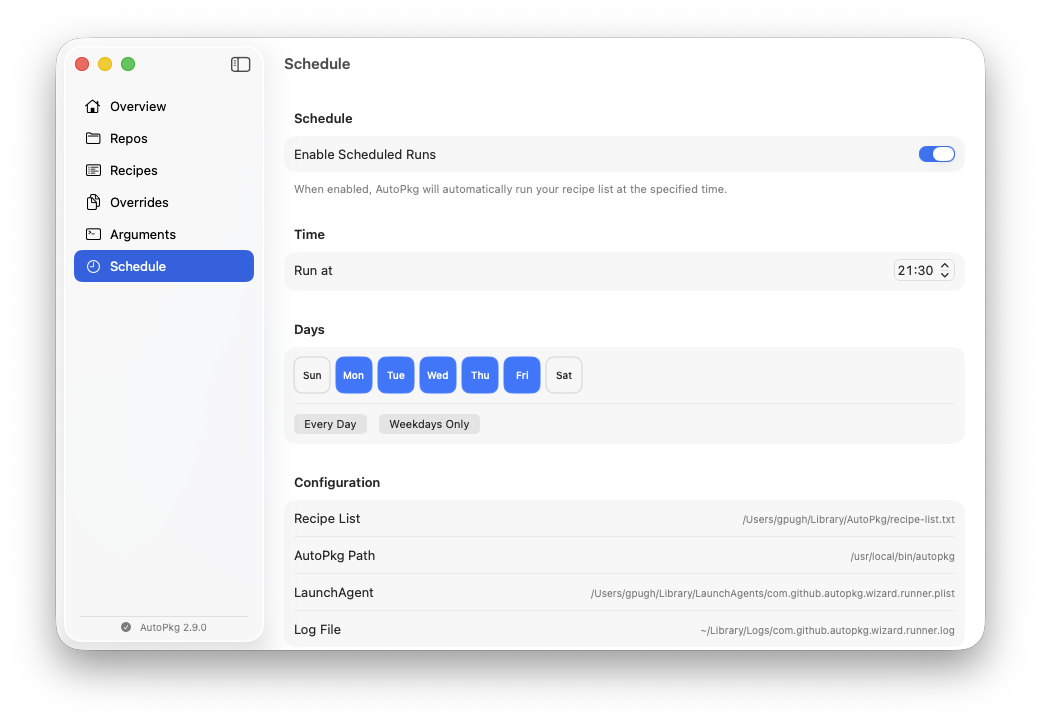
Two sections depart from the app being purely a skin over the autopkg commands and files. These are the Schedule and Arguments sections, both added for convenience and extra functionality.
Scheduling
One of the most useful features of AutoPkgr is its scheduled recipe run component. I have tried to provide a simple scheduling component, where you can choose which days of the week that a daily run should occur, and what time.
Arguments: Parameters, pre- and post-processors, packages
My current use of AutoPkg often requires providing overrides for individual keys. While these can be added to Recipe Overrides, these are often one-off keys such as an override to a target smart group for a particular customer. I decided that it could be useful to save these key-value pairs locally for use when required. Any key-value pair you save can be enabled or disabled, and will apply to any recipe that is run. As these run with the --key argument, they will take precedence over any key in a recipe, override or the preferences file.
Pre-processors and post-processors are processors designed to be run before or after each individual recipe (obviously!). There are many reasons you might want to run a pre- or postprocessor, such as setting the default Munki catalog, or sending notifications to services like Slack (5), Teams (6), and Jira (7).
Finally, some recipes require you to provide a path to locally stored installer material, typically because there is no public repository of that material that AutoPkg can access. This is achieved with autopkg at the command line using the --pkg /path/to/file argument (which is the same as --key PKG=/path/to/file). I have added the option to add and store package paths in the Arguments section. These can be enabled or disabled as with the key-value pairs, although only one can be enabled at a time.
Munki catalogs
Every Munki administrator knows about having to remember to add MunkiCatalogs.munki to the end of your recipe list, in order to update the catalogs, which prevents the same recipe running over and over again and creating duplicate entries. I’ve tried to handle this automatically - if you add any munki recipe, the MunkiCatalogs.munki recipe is also added, and moved to the bottom of the recipe list. It’s also automatically overridden. Remove all munki recipes, and MunkiCatalogs.munki is also removed, since it’s of no concern to users of other package management tools.
Mac Admins Open Source
This project wasn’t informed by a need at work, and isn’t meant to be of use only to Jamf Pro users, but rather to all AutoPkg users. That’s why I didn’t want to tie it to Jamf, and why I avoided using my work Claude Code license to create it, but kept to more affordable AI. It’s fully open source, with an MIT license, and I’m proud to say has been accepted into the Mac Admins Open Source organisation so that it is signed with a recognisable developer certificate that you may already be allow-listing for projects like Nudge, Escrow Buddy, Contour and Pique. You can grab it from the AutoPkg Releases Page (9).
Conclusion
Since mentioning the first version of this app in the #autopkg channel two weeks ago, I’ve already had suggestions for improvements and a few pull requests. Thanks! I’ve also had supportive words from Shawn and Elliot, both of whom have been maintaining AutoPkgr all these years. I’m not sure what the future of AutoPkgr is - I’ll be happy if development continues, but if it doesn’t, then I hope AutoPkg Wizard proves useful to those people looking for an alternative.
As I said in my previous post about plistyamlplist, I’m hoping to use this project as a way of learning SwiftUI and not to rely totally on AI to maintain it. If you have ideas for improvements, or find bugs, get in touch or add a Feature Request, Bug Report, or Pull Request to the project’s GitHub page (github.com/macadmins/autopkg-wizard (10)!