Can we detect the apps that will block an overnight Software Update?
Introduction
If you’ve used macOS 26 or 27, I suspect a lot of you have seen the notification that says “Close apps before scheduled update”. This happens if you opt for a macOS software update to be performed “later tonight”.
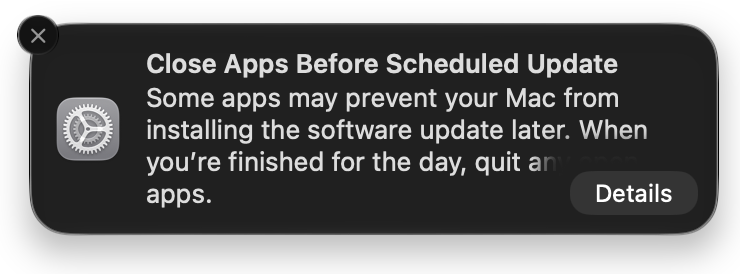
Disappointingly, if you click on “Details”, you’re taken to the Software Update settings page, which shows which update will be installed, but says absolutely nothing about which apps are going to prevent your Mac from installing the software update later. If you’ve got more than a small number of apps open (who doesn’t?), you may as well perform the update now, since the only realistic way to know which apps will prevent shutdown is to try and quit those apps and wait for the dialogs to appear.
I decided to investigate if there was a better way of finding out.
TL;DR - not really.
What apps and scenarios prevent shut down?
Common reasons for an app preventing shutdown include:
- A document, sheet or form in the app is in an edited, unsaved state.
- A modal dialog is open in the app.
- An app is unresponsive.
- A terminal-type app has an elevated (root) state open.
Can we detect these states using a command?
I’m absolutely no expert, but it seems that there is no single way to detect whether an app is in a state that will prevent shutdown. Some apps are designed to be able to automatically save open documents - these often include a key in their Info.plist file called NSSupportsSuddenTermination, set to true. However, many of these apps give you the option to turn the autosave feature on or off, and even when enabled, autosave operations may not work on a new, never-saved document.
Apple System Events sometimes gives access to useful information. It can, for example, detect an open modal dialog, and can detect elevated child process descendants of Terminal apps. AppleScript’s System Events can be used to detect some of this. But no single command is going to do it.
I made a “Blocking Apps” app
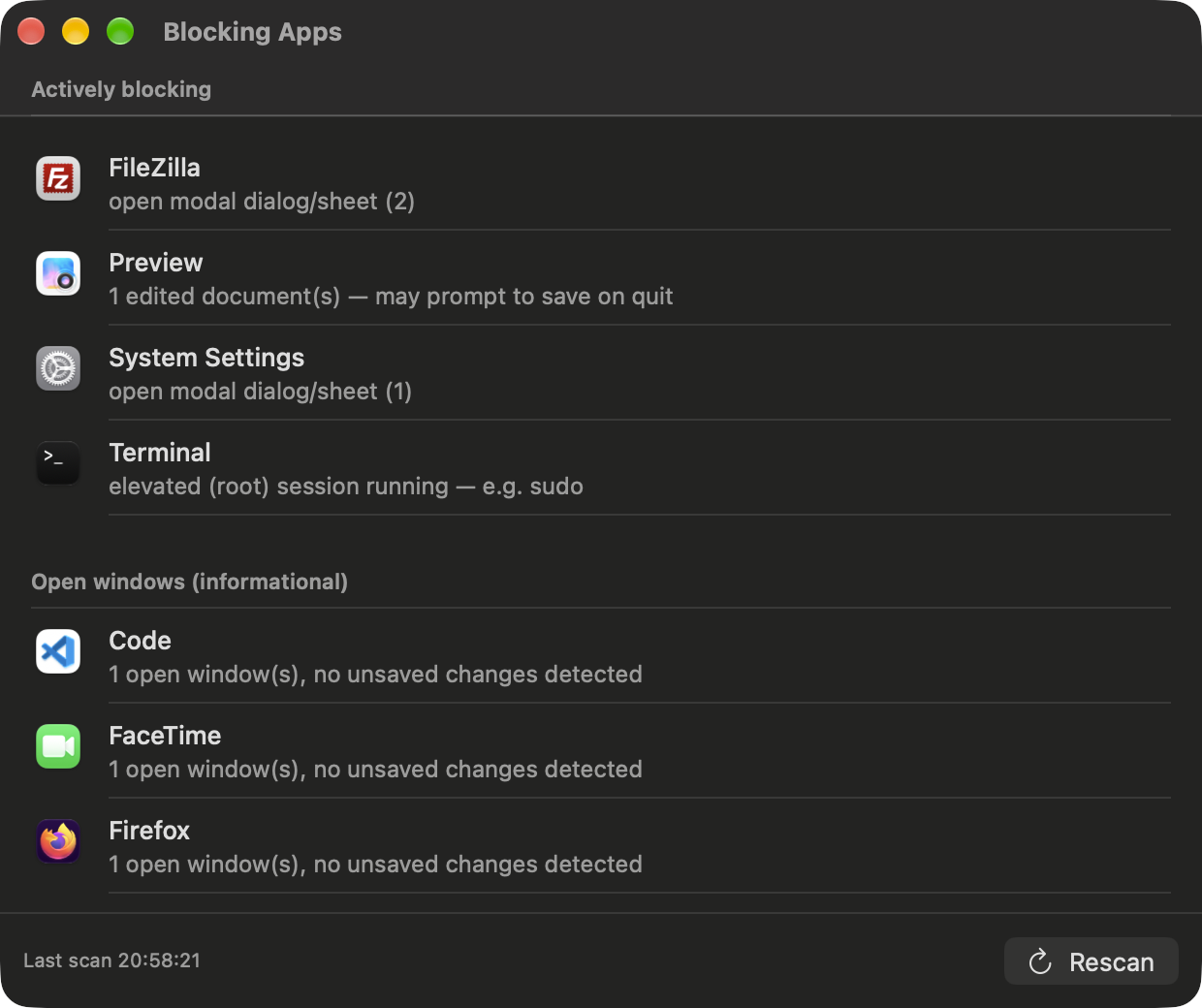
Curious to see if I could build some sort of blocking apps detective tool, I started making a script to perform various detections, using AppleScript to ask the System Events to check app/window status, but quickly found that this was very slow. So I started looking into whether Swift would be better, since it has direct access to the Accessibility API. This resulted in a little SwiftUI app that I’ve called “Blocking Apps” [1]. It’s job is to show apps that are likely to cause a shutdown to fail.
The key word is “likely”. I worked with Claude to detect the state of various apps - notably, some of the native Apple apps that work with documents - Keynote, Numbers, Pages, Preview and TextEdit. There was a lot of back-and-forth between Claude’s assumptions and my observations. For example, not all the Apple apps expose their state in the same way. They all show “Edited” in the title bar when there’s an unsaved document - though this is localized, or sometimes it will say “Suggested” for the name of an as-yet unsaved new document. However, some of these states allow the app to close due to auto-save, but others don’t (e.g. a new, unsaved but edited document). It’s not even consistent across the iWork suite, and changed between the old and newer “Apple Creator Studio” [2] versions.
Unfortunately, I found some other apps that were not able to be detected by the Accessibility API. One such app was KeePassXC. If you click on add entry, and make any single change to the new entry, the app will prompt you to save if you try and close it. But, this isn’t detected.
So, the app is best-efforts. It shows apps that are classed a high risk of preventing shutdown, but lists all other apps which have an open window, so could theoretically prevent shutdown. There will be false positives and false negatives.
Clicking on the icon of each listed app takes you to that app to help you investigate and close the open window, save the file, or exit the elevated terminal session.
How it went
Unfortunately, for the app to be able to detect the status of other apps, it requires you to grant Accessibility access - now known in macOS 27 Golden Gate as “Device Control and Data Access”. As Apple is starting to frown upon vendors using the Accessibility API for non-accessibility-related purposes, I suspect this will be a short-lived app, unless there is some more modern API unbeknownst to me that has access to monitor the windows or status of other apps.
So, this exercise didn’t really have a satisfactory conclusion on two counts. First, I didn’t truly discover a definitive way of indicating which apps will prevent your update running later tonight. The app does a reasonable job with the apps that I tested, but I suspect that some other apps work in a different way, which would either need to have their own custom detections built in to the app, or are undetectable, as with KeePassXC.
(“Undetectable” is a stretch. Apple clearly have some internal method of detection, because the “Close apps before scheduled update” notification doesn’t appear every time you schedule an update, so some kind of logic is being used to determine that shutdown may be prevented. I don’t have enough evidence to say whether Apple’s method is any more reliable than Blocking App’s methods.)
Secondly, I’m not satisfied with the requirement for Accessibility control to use the app. I’m not sure if the Endpoint Security Framework could be used instead, but that requires Full Disk Access, so arguably would not be an improvement.
However, despite those caveats, I have personally found the app to be genuinely helpful over the past few weeks. My work and personal laptops are both usually on the macOS beta track, so I get software update notifications most weeks. The most likely candidates for apps that would prevent my computer updating are TextEdit, into which I often dump text for some temporary need and then forget to close, Terminal being elevated to root or in an SSH session, or some modal popup such as an app update window. Blocking Apps detects all these, and provides a convenient link to go straight to the app.
Conclusion
I believe that the “Close apps before scheduled update” notification in its current form is not useful, and Apple could vastly improve its utility by listing the apps that are likely to prevent shutdown (if the system is indeed aware in advance of the apps in that state).
In discussions on the topic, there was some disagreement that a list would be useful, on the basis that the apps that are open at the time of the notification may not be the same as the apps that are open at the time the update is attempted - the user could open other apps in the meantime. My counter to that is that in that case, the notification is just noise. Notifications that don’t provide meaningful information that the user can do anything to resolve are not useful, and just lead to notification fatigue - blindness to their content leading to clicking away anything that could potentially actually be important. At least in my case, using Blocking Apps has increased the success of the “update later” process.
in case you want to see whether it’s of use to you. I’ve created a signed-and-notarized release of the Blocking Apps app. You can find the latest release on the Github releases [3] page.
If you find an app that Blocking Apps doesn’t detect correctly, please raise a GitHub issue [4] and I’ll look into whether there is a bespoke method that would work for that app.
More importantly, if you have knowledge of a better framework for detecting app ‘closeability’ status, please let me know! I would personally find a definitive method of detection to be a real improvement to the macOS user experience.